

First trueColor3D only ran on Windows, because it strongly depended on the AviSynth audio/video scripting environment that is tricky to run on non-Windows machines.
I started to reprogram many of the conversions from AviSynth to only use video filter commands in ffmpeg.
This is the first result.
On OSX, the following old/new stereo-layouts are supported :
Youtube: my3D, iPad (over/under 1080p)
Vimeo: my3D, iPad (over/under), PC (over/under)
home use: my3D, iPad (iTunes), iPad (AirVideo)
Download version 0.95 from my DropBox :
Source code only (v0.95),
Windows 32-bit binary (v0.94),
OSX 32-bit binary (v0.95)
Posts mit dem Label ipad3-D werden angezeigt. Alle Posts anzeigen
Posts mit dem Label ipad3-D werden angezeigt. Alle Posts anzeigen
Dienstag, 2. August 2011
trueColor3D now also runs on OSX

Mittwoch, 11. Mai 2011
Looking for 3-D content to co-market on iPad3D/iPhone3D
I'm currently preparing some Apps for the Apple AppStore and the Android market place. They will bring the first payed and DRM protected trueColor3D content to all smartphones (using Hasbro's my3D or a Lorgnette) and tablets (using the openKMQ over/under method). The concept includes instruction videos, embedded credit webpages and can either show a single 3-D video, a group of them with HTML5 title menu or even a slideshow/gallery of themed stereo pairs.
Please contact me by email, if you are interested to also sell your 3-D content.
The concept is based on open source and will become an open source framework, but obviously, your final product will be closed source.
Please contact me by email, if you are interested to also sell your 3-D content.
The concept is based on open source and will become an open source framework, but obviously, your final product will be closed source.
Donnerstag, 23. Dezember 2010
Beta release Win32/OSX of the openKMQ 3-D video converter (aka trueColor3D.exe)


For all Windows 32-bit and OSX (64/32bit) users willing to give the new application a try, feel free to download the zip archive from my DropBox account and install it together with ffmpeg and AviSynth (not on OSX).
It converts your own or downloaded side-by-side and over/under videos to be viewed with openKMQ or GRilli3D.
Download version 0.99 (OSX) or 0.94 (Win) from my DropBox :
OSX 32-bit binary (v0.99),
Windows 32-bit binary (v0.94)
The source code is available at github
I have downloaded some trailers from YouTube using firefox/greasemonkey and the userscript "YouTube HD Suite" and now I can watch them full color on my iPad1.
For me the EXE works fine and the later conversion produces both files to upload to vimeo, view 3-D on any 2D display - and iPad as mentioned before.
It also has an option to stream your 3-D content from PC/Mac/Linux using the AirVideo App (the free version handles up to 3 movies in your folder - should be enough for a day and then you replace them with others). For all who already have received a GRilli3D lenticular film for iPad, this is also supported, but I couldn't test if I ordered L/R the right way ;-) Please test drive and swamp me with errors (hope not) and suggestions (hope yes!).
Merry Christmas and a Happy new year.
----
Update:
From version 0.92 on the program is called trueColor3D.exe
From version 0.93 on also GRilli3D for iPod and ACER 3D laptops are supported.
From version 0.94 on also my3D and Lorgnette on iPhone4 or iPodTouch4 are supported. (see sister blog openMy3D.
From version 0.95 on, also OSX is supported.
----
Here are sample out files to play in true color 3-D on iPad
For over/under and for GRilli3D glasses free .
----
And here is the link to the first new vimeo channel for "3-D true color openKMQ videos" and the experimental vimeo channel for "3-D true color autostereoscopic videos for GRilli3D (iPad1)".
Mittwoch, 10. November 2010
Apple goes 3-D with Haspro on mobile devices
Haspro announced that early next year it will sell My3D, a plastic "viewmaster"-like viewer to plug on an iPhone or iPod touch to watch side-by-side video and play 3-D games. Content providers like Dreamworks will follow as well.
I very much hope for iPad they will go the over/under route :-)
I very much hope for iPad they will go the over/under route :-)
YT 3-D video introducing to over/under photo books (german)
Richard Hebstreit's 3-D interview with me on YouTube
openKMQ videos can be hosted on vimeo
Vimeo is less restricted in terms of aspect ratio and resolutions than YouTube.
So many vimeo contributors have uploaded not only Anaglyph 3-D videos but also side-by-side up to 4K (3840x1080). Since yesterday, you can also see my first over/under video (768x1024 XGA portrait) optimized to play on iPad in full color 3-D and on any LCD in fullscreen mode (switch scale to ON) either landscape or rotated to portait. Silent 3-D Test video (Berlin fleemarket)
So many vimeo contributors have uploaded not only Anaglyph 3-D videos but also side-by-side up to 4K (3840x1080). Since yesterday, you can also see my first over/under video (768x1024 XGA portrait) optimized to play on iPad in full color 3-D and on any LCD in fullscreen mode (switch scale to ON) either landscape or rotated to portait. Silent 3-D Test video (Berlin fleemarket)
Donnerstag, 9. September 2010
How to create 3-D videos in the openKMQ, open over/under layout
If you want to also convert your private videos to openKMQ layout or want to upload them to vimeo, please use this layout.

Such a video plays on any LCD in fullscreen mode (VCL can play on portrait mode displays), even iMacs, iBooks, iPad, iPod Touch 4, iPhone 4. For the 960x640 displays of the 4th gen iPhone/iPodtouch you need a special viewer not yet released.
UPDATE for vimeo content:
If you upload a video 768px wide, vimeo ignores the height and assumes it's an SD european clip that needs non square pixel treatment. Fair enough, but this cripples XGA portrait mode clips optimized for iPad use.
And to achieve HD quality bandwidth, a video needs 1280px width or wider. This sucks as well. Again, vimeo ignores the height.
So if you want your clip to be watched on vimeo including iPad users, please use a slighty smaller res of 764x1020 and encourage your viewers to download the original video for optimal local play or import to the iPad Photos App.
My new free conversion tool trueColor3D will automatically take care of that, from version 0.92 on.
Such a video plays on any LCD in fullscreen mode (VCL can play on portrait mode displays), even iMacs, iBooks, iPad, iPod Touch 4, iPhone 4. For the 960x640 displays of the 4th gen iPhone/iPodtouch you need a special viewer not yet released.
UPDATE for vimeo content:
If you upload a video 768px wide, vimeo ignores the height and assumes it's an SD european clip that needs non square pixel treatment. Fair enough, but this cripples XGA portrait mode clips optimized for iPad use.
And to achieve HD quality bandwidth, a video needs 1280px width or wider. This sucks as well. Again, vimeo ignores the height.
So if you want your clip to be watched on vimeo including iPad users, please use a slighty smaller res of 764x1020 and encourage your viewers to download the original video for optimal local play or import to the iPad Photos App.
My new free conversion tool trueColor3D will automatically take care of that, from version 0.92 on.
Dienstag, 7. September 2010
Play your 3-D Bluray content on any device
Until recently you could play 3D Blurays only on very expensive 3DTV sets with a 3D enabled player and 3D shutter glasses.
That changed when the website biohemmet.se described a way and provided a tool to extract the content of your legaly owned discs to left/right movies to also play on StereoscopicPlayer or with the NVIDIA 3DVISION solution. But even this needed expensive hardware. From this version of 3DBDBuster on, the tool will also offer conversion to the new openKMQ video format as described recently. This opens 3D viewing to any LCD using the over/under viewing method with either the prism viewer KMQ SSG1b or the mirror viewer jpsOneEye.
Find a link to this solution on the right hand column.
That changed when the website biohemmet.se described a way and provided a tool to extract the content of your legaly owned discs to left/right movies to also play on StereoscopicPlayer or with the NVIDIA 3DVISION solution. But even this needed expensive hardware. From this version of 3DBDBuster on, the tool will also offer conversion to the new openKMQ video format as described recently. This opens 3D viewing to any LCD using the over/under viewing method with either the prism viewer KMQ SSG1b or the mirror viewer jpsOneEye.
Find a link to this solution on the right hand column.
Freitag, 20. August 2010
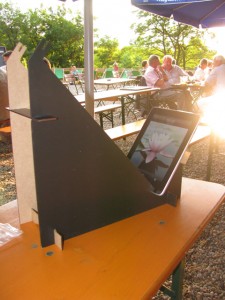
New design for the iPad stand
The improved design comes with the following features :
- now also supports the jpsOneEye first surface mirror viewer
- use an elastic to secure both viewers
- an optional light shield and a black blanket to cut off reflections from the glossy iPad screen.


Donnerstag, 29. Juli 2010
Intro video for the openKMQ kit for iPad (german)
There's a blog report with video about the openKMQ kit for iPad (sorry folks, german only).
(Source: Danniil Matzkuhn / tblt.de)
Straight to the YouTube 2D video.
Abonnieren
Posts (Atom)
