Posts mit dem Label S3D werden angezeigt. Alle Posts anzeigen
Sonntag, 2. September 2012
My trueColor3D talk as PDF
PDF of my trueColor3D talk at Campus Party in Berlin.
My trueColor3D talk as PDF
Tags:
3Dvu2go,
campusparty,
GRilli3D,
hasbro,
ipad,
iPhone,
My3D,
open hardware,
open software,
opensource,
S3D,
smartphone,
stereoscopic,
stereoskopisch,
tablet,
TOYin3D,
trueColor3D
Freitag, 2. März 2012
How to best watch trueColor3D video clips on Android tablets
I recently saw a trueColor3D video on a Samsung Galaxy Tab using the over/under method similar to my iPad experience.
Unfortunately the native Android Apps for vimeo and Youtube both limit playback to landscape videos, so I recommend to use the webBrowser to visit these sites.
And the limitations of framesizes and bandwidth are more strict as on my old iPad1.
There are some videos that play fine on iOS 4.2 but bring an "unknown" error on Android 2.3.x
If anyone knows more about these obscure limits, please tell me more, so I can finetune the presets of trueColor3D.exe
Unfortunately the native Android Apps for vimeo and Youtube both limit playback to landscape videos, so I recommend to use the webBrowser to visit these sites.
And the limitations of framesizes and bandwidth are more strict as on my old iPad1.
There are some videos that play fine on iOS 4.2 but bring an "unknown" error on Android 2.3.x
If anyone knows more about these obscure limits, please tell me more, so I can finetune the presets of trueColor3D.exe
I recently saw a trueColor3D video on a Samsung Galaxy Tab using the over/under method similar to my iPad experience.
Unfortunately the native Android Apps for vimeo and Youtube both limit playback to landscape videos, so I recommend to use the webBrowser to visit these sites.
And the limitations of framesizes and bandwidth are more strict as on my old iPad1.
There are some videos that play fine on iOS 4.2 but bring an "unknown" error on Android 2.3.x
If anyone knows more about these obscure limits, please tell me more, so I can finetune the presets of trueColor3D.exe
Unfortunately the native Android Apps for vimeo and Youtube both limit playback to landscape videos, so I recommend to use the webBrowser to visit these sites.
And the limitations of framesizes and bandwidth are more strict as on my old iPad1.
There are some videos that play fine on iOS 4.2 but bring an "unknown" error on Android 2.3.x
If anyone knows more about these obscure limits, please tell me more, so I can finetune the presets of trueColor3D.exe
How to best watch trueColor3D video clips on Android tablets
Tags:
Android,
galaxy tab,
ipad,
openKMQ,
over/under,
S3D,
samsung,
stereoscopic,
tablet,
trueColor3D,
vimeo,
YouTube,
YT3D
Freitag, 7. Oktober 2011
Gorgeous Women 1
I uploaded a slide show with depth-painted 3D stills made by the Youtube user XtraDefinition3D aka XD3D on flickr
Gorgeous Women in trueColor3D for over/under viewing
I uploaded a slide show with depth-painted 3D stills made by the Youtube user XtraDefinition3D aka XD3D on flickr
Gorgeous Women in trueColor3D for over/under viewing
Gorgeous Women 1
Tags:
ipad3D,
openKMQ,
S3D,
stereoscopic,
Stereoskopie,
trueColor3D,
XD3D,
XtraDefinition3D
Dienstag, 30. August 2011
Pinkau Entertainment brings its showreel to trueColor3D
With the help of trueColor3D 0.97 on OSX the following variants have been converted and uploaded to vimeo :
for 3D smartphone goggles (like the Hasbro my3D or the TOYin3D)
for tablet devices (like the Apple iPad using an over/under viewer)
for laptops and any normal LCD (also using the over/under method).
Find out more about the german team of Thomas Pinkau.
They also have a Youtube3D upload (unfortunately only a distorted, aka frame compatible version).
I hope to also find trueColor3D version on Youtube soon.
for 3D smartphone goggles (like the Hasbro my3D or the TOYin3D)
for tablet devices (like the Apple iPad using an over/under viewer)
for laptops and any normal LCD (also using the over/under method).
Find out more about the german team of Thomas Pinkau.
They also have a Youtube3D upload (unfortunately only a distorted, aka frame compatible version).
I hope to also find trueColor3D version on Youtube soon.
With the help of trueColor3D 0.97 on OSX the following variants have been converted and uploaded to vimeo :
for 3D smartphone goggles (like the Hasbro my3D or the TOYin3D)
for tablet devices (like the Apple iPad using an over/under viewer)
for laptops and any normal LCD (also using the over/under method).
Find out more about the german team of Thomas Pinkau.
They also have a Youtube3D upload (unfortunately only a distorted, aka frame compatible version).
I hope to also find trueColor3D version on Youtube soon.
for 3D smartphone goggles (like the Hasbro my3D or the TOYin3D)
for tablet devices (like the Apple iPad using an over/under viewer)
for laptops and any normal LCD (also using the over/under method).
Find out more about the german team of Thomas Pinkau.
They also have a Youtube3D upload (unfortunately only a distorted, aka frame compatible version).
I hope to also find trueColor3D version on Youtube soon.
Pinkau Entertainment brings its showreel to trueColor3D
Tags:
3D,
anaglyphs,
ipad,
My3D,
Pinkau,
S3D,
showreel,
stereoscopic,
TOYin3D,
trueColor3D
Dienstag, 23. August 2011
Update of trueColor3D on OSX
After having some trouble with the libav parts used in ffmpeg, I found workarounds and now proudly present version 0.96.
I recently only worked on OSX Lion, so for now only the OSX binaries are available.
This version is the first to run without AviSynth, the very powerful, but Windows-only video post processing toolbox.
It outputs clips that can either play YT3D downloads for home use using AirVideo, or to upload your own work to Youtube (yes they play on iPad and iPhone, here are some examples from a beta tester) or even vimeo. You can also use it to prepare 3-D podcasts (testing) or clips to embed in iOS Apps to sell on the Apple AppStore.
Email me, if you need the new features also under Windows that is currently on version 0.94.
Download the source code here.
Download the binaries for OSX here.
Make sure to install both trueColor3D and qt-faststart as well as a decent version of ffmpeg in your path.
I recently explained how to install/build ffmpeg on OSX.
If you find this tool useful, please recommend it and consider opening a flattr account.
My project related tweets are from @openKMQ3D and use the hash tag #trueColor3D.
I recently only worked on OSX Lion, so for now only the OSX binaries are available.
This version is the first to run without AviSynth, the very powerful, but Windows-only video post processing toolbox.
It outputs clips that can either play YT3D downloads for home use using AirVideo, or to upload your own work to Youtube (yes they play on iPad and iPhone, here are some examples from a beta tester) or even vimeo. You can also use it to prepare 3-D podcasts (testing) or clips to embed in iOS Apps to sell on the Apple AppStore.
Email me, if you need the new features also under Windows that is currently on version 0.94.
Download the source code here.
Download the binaries for OSX here.
Make sure to install both trueColor3D and qt-faststart as well as a decent version of ffmpeg in your path.
I recently explained how to install/build ffmpeg on OSX.
If you find this tool useful, please recommend it and consider opening a flattr account.
My project related tweets are from @openKMQ3D and use the hash tag #trueColor3D.
After having some trouble with the libav parts used in ffmpeg, I found workarounds and now proudly present version 0.96.
I recently only worked on OSX Lion, so for now only the OSX binaries are available.
This version is the first to run without AviSynth, the very powerful, but Windows-only video post processing toolbox.
It outputs clips that can either play YT3D downloads for home use using AirVideo, or to upload your own work to Youtube (yes they play on iPad and iPhone, here are some examples from a beta tester) or even vimeo. You can also use it to prepare 3-D podcasts (testing) or clips to embed in iOS Apps to sell on the Apple AppStore.
Email me, if you need the new features also under Windows that is currently on version 0.94.
Download the source code here.
Download the binaries for OSX here.
Make sure to install both trueColor3D and qt-faststart as well as a decent version of ffmpeg in your path.
I recently explained how to install/build ffmpeg on OSX.
If you find this tool useful, please recommend it and consider opening a flattr account.
My project related tweets are from @openKMQ3D and use the hash tag #trueColor3D.
I recently only worked on OSX Lion, so for now only the OSX binaries are available.
This version is the first to run without AviSynth, the very powerful, but Windows-only video post processing toolbox.
It outputs clips that can either play YT3D downloads for home use using AirVideo, or to upload your own work to Youtube (yes they play on iPad and iPhone, here are some examples from a beta tester) or even vimeo. You can also use it to prepare 3-D podcasts (testing) or clips to embed in iOS Apps to sell on the Apple AppStore.
Email me, if you need the new features also under Windows that is currently on version 0.94.
Download the source code here.
Download the binaries for OSX here.
Make sure to install both trueColor3D and qt-faststart as well as a decent version of ffmpeg in your path.
I recently explained how to install/build ffmpeg on OSX.
If you find this tool useful, please recommend it and consider opening a flattr account.
My project related tweets are from @openKMQ3D and use the hash tag #trueColor3D.
Update of trueColor3D on OSX
Tags:
3-D,
flattr,
flattrware,
My3D,
open source,
OSX,
S3D,
stereoscopic,
TOYin3D,
trueColor3D
Dienstag, 26. Juli 2011
Free 2D to S3D conversion software
Find more information on the author's project page http://www.Gimpel3D.com/
Free 2D to S3D conversion software
Tags:
2D,
3D,
conversion,
Free,
gimple3D,
S3D,
stereoscopic,
stereoskopisch
Dienstag, 12. April 2011
TOSHIBA goes glasses-free 3DTV
German blog article about future glasses-free smart 3DTVs from TOSHIBA.
TOSHIBA goes glasses-free 3DTV
Tags:
3DTV,
ARM,
autostereoscopic,
S3D,
stereoscopic,
toshiba
Montag, 11. April 2011
Why Peter Jackson shots 3-D with 48 frames per second
Not only James Cameron is a fan of shooting strobe-free higher frame rates. Peter Jackson is capturing THE HOBBIT (1+2) in double frame rate 3-D using dozens of RED EPIC cameras.
Link to Peter Jackson's Facebook page with details, how and why he does so.
Not only James Cameron is a fan of shooting strobe-free higher frame rates. Peter Jackson is capturing THE HOBBIT (1+2) in double frame rate 3-D using dozens of RED EPIC cameras.
Link to Peter Jackson's Facebook page with details, how and why he does so.
Why Peter Jackson shots 3-D with 48 frames per second
Tags:
24 fps,
48 fps,
60 fps,
LOTR,
Peter Jackson,
S3D,
ShowScan,
stereoscopic,
THE HOBBIT,
Warner
Montag, 10. Januar 2011
New vimeo channel for trueColor3D on iPad1 with GRilli3D autostereoscopic lenticular sheet
Find an autostereoscopic version of the ECC/Home of 3D 2010 demo reel on the new vimeo channel openGRilli3D.
It was made with the version 0.92 of trueColor3D.exe
Find an autostereoscopic version of the ECC/Home of 3D 2010 demo reel on the new vimeo channel openGRilli3D.
It was made with the version 0.92 of trueColor3D.exe
New vimeo channel for trueColor3D on iPad1 with GRilli3D autostereoscopic lenticular sheet
Tags:
3-D,
autostereoscopic,
GRilli3D,
ipad3D,
openKMQ,
S3D,
trueColor3D,
vimeo
Freitag, 7. Januar 2011
First trueColor3D stereoscopic slide show on vimeo
This video was created handing 129 stereopairs and captions over to the new program StereoBookMaker (SBM). SBM can also create dozens of true color 3-D booklet layouts and stereocards from this data set. Its Windows version is coming soon.
Many thanks to the Stereo-Photographer Eberhard Gehrke for providing pictures and text.
This video was created handing 129 stereopairs and captions over to the new program StereoBookMaker (SBM). SBM can also create dozens of true color 3-D booklet layouts and stereocards from this data set. Its Windows version is coming soon.
Many thanks to the Stereo-Photographer Eberhard Gehrke for providing pictures and text.
First trueColor3D stereoscopic slide show on vimeo
Tags:
3-D,
A Railway Bridge Moves,
Eberhard Gehrke,
Eine Brücke zieht um,
Erkner,
kmq,
openKMQ,
openKQM3D,
S3D,
SBM,
slide show,
StereoBookMaker,
stereoscopic,
trueColor3D,
vimeo 3D
Samstag, 1. Januar 2011
First clip made from DualFullHD content available on vimeo in trueColor3D
For my Berlin based friend Paul Stutenbäumer, I converted his demo reel to the new channel on vimeo, using over/under true color stereoscopic viewing instead of legacy anaglyphs.
But I encountered some pitfalls in the vimeo internals.
If you upload a video 768px wide, vimeo ignores the height and assumes it's an SD european clip that needs non square pixel treatment. Fair enough, but this cripples XGA portrait mode clips optimized for iPad use.
And to achieve HD quality bandwidth, a video needs 1280px width or wider. This sucks as well. Again, vimeo ignores the height.
So if you want your clip to be watched on vimeo including iPad users, please use a slighty smaller res of 764px x 1020px and encourage your viewers to download the original video for optimal local play or import to the iPad Photos App.
And please ask vimeo staff to change the policy ignoring height for bandwidth decisions.
But I encountered some pitfalls in the vimeo internals.
If you upload a video 768px wide, vimeo ignores the height and assumes it's an SD european clip that needs non square pixel treatment. Fair enough, but this cripples XGA portrait mode clips optimized for iPad use.
And to achieve HD quality bandwidth, a video needs 1280px width or wider. This sucks as well. Again, vimeo ignores the height.
So if you want your clip to be watched on vimeo including iPad users, please use a slighty smaller res of 764px x 1020px and encourage your viewers to download the original video for optimal local play or import to the iPad Photos App.
And please ask vimeo staff to change the policy ignoring height for bandwidth decisions.
For my Berlin based friend Paul Stutenbäumer, I converted his demo reel to the new channel on vimeo, using over/under true color stereoscopic viewing instead of legacy anaglyphs.
But I encountered some pitfalls in the vimeo internals.
If you upload a video 768px wide, vimeo ignores the height and assumes it's an SD european clip that needs non square pixel treatment. Fair enough, but this cripples XGA portrait mode clips optimized for iPad use.
And to achieve HD quality bandwidth, a video needs 1280px width or wider. This sucks as well. Again, vimeo ignores the height.
So if you want your clip to be watched on vimeo including iPad users, please use a slighty smaller res of 764px x 1020px and encourage your viewers to download the original video for optimal local play or import to the iPad Photos App.
And please ask vimeo staff to change the policy ignoring height for bandwidth decisions.
But I encountered some pitfalls in the vimeo internals.
If you upload a video 768px wide, vimeo ignores the height and assumes it's an SD european clip that needs non square pixel treatment. Fair enough, but this cripples XGA portrait mode clips optimized for iPad use.
And to achieve HD quality bandwidth, a video needs 1280px width or wider. This sucks as well. Again, vimeo ignores the height.
So if you want your clip to be watched on vimeo including iPad users, please use a slighty smaller res of 764px x 1020px and encourage your viewers to download the original video for optimal local play or import to the iPad Photos App.
And please ask vimeo staff to change the policy ignoring height for bandwidth decisions.
First clip made from DualFullHD content available on vimeo in trueColor3D
Tags:
ipad,
ipad3D,
openKMQ,
over/under,
prism viewer,
S3D,
stereoscopic,
trueColor3D,
vimeo,
vimeo3D
Dienstag, 21. Dezember 2010
Developing a conversion tool to create openKMQ compatible videos
Right now I'm figuring out ways to convert side-by-side videos (either frame compatible or not) to the openKMQ format that directly plays on vimeo and also on iPads.
My goal was to create a true cross platform application starting with Windows, Linux and OSX and so I decided on using the GPL ffmpeg for processing and Qt for the user interface.
Unfortunately some video filter functionality vital to my approach are not released yet.
So I will first implement a variant using AviSynth and a ffmpeg config enabled to work with avs files.
Features to be implemented first:
Play 3D videos directly either with a DirectShow compatible player or ffplay using tiny avs script files.
Convert those downloaded 3D videos so that the new files can be imported to your iPad3D for offline viewing.
Convert 3D video edited with the new breed of 3-D capable editing tools VegasPro, MAGIX, etc to be played full color on vimeo
Later
Also support conversion to My3D compatible videos.
as well as the new 3df33d video portal
Port to OSX and Ubuntu when the needed features in ffmpeg become mature.
Please comment if your see need for more to be added
My goal was to create a true cross platform application starting with Windows, Linux and OSX and so I decided on using the GPL ffmpeg for processing and Qt for the user interface.
Unfortunately some video filter functionality vital to my approach are not released yet.
So I will first implement a variant using AviSynth and a ffmpeg config enabled to work with avs files.
Features to be implemented first:
Play 3D videos directly either with a DirectShow compatible player or ffplay using tiny avs script files.
Convert those downloaded 3D videos so that the new files can be imported to your iPad3D for offline viewing.
Convert 3D video edited with the new breed of 3-D capable editing tools VegasPro, MAGIX, etc to be played full color on vimeo
Later
Also support conversion to My3D compatible videos.
as well as the new 3df33d video portal
Port to OSX and Ubuntu when the needed features in ffmpeg become mature.
Please comment if your see need for more to be added
Right now I'm figuring out ways to convert side-by-side videos (either frame compatible or not) to the openKMQ format that directly plays on vimeo and also on iPads.
My goal was to create a true cross platform application starting with Windows, Linux and OSX and so I decided on using the GPL ffmpeg for processing and Qt for the user interface.
Unfortunately some video filter functionality vital to my approach are not released yet.
So I will first implement a variant using AviSynth and a ffmpeg config enabled to work with avs files.
Features to be implemented first:
Play 3D videos directly either with a DirectShow compatible player or ffplay using tiny avs script files.
Convert those downloaded 3D videos so that the new files can be imported to your iPad3D for offline viewing.
Convert 3D video edited with the new breed of 3-D capable editing tools VegasPro, MAGIX, etc to be played full color on vimeo
Later
Also support conversion to My3D compatible videos.
as well as the new 3df33d video portal
Port to OSX and Ubuntu when the needed features in ffmpeg become mature.
Please comment if your see need for more to be added
My goal was to create a true cross platform application starting with Windows, Linux and OSX and so I decided on using the GPL ffmpeg for processing and Qt for the user interface.
Unfortunately some video filter functionality vital to my approach are not released yet.
So I will first implement a variant using AviSynth and a ffmpeg config enabled to work with avs files.
Features to be implemented first:
Play 3D videos directly either with a DirectShow compatible player or ffplay using tiny avs script files.
Convert those downloaded 3D videos so that the new files can be imported to your iPad3D for offline viewing.
Convert 3D video edited with the new breed of 3-D capable editing tools VegasPro, MAGIX, etc to be played full color on vimeo
Later
Also support conversion to My3D compatible videos.
as well as the new 3df33d video portal
Port to OSX and Ubuntu when the needed features in ffmpeg become mature.
Please comment if your see need for more to be added
Developing a conversion tool to create openKMQ compatible videos
Tags:
3df33d,
avisynth,
ffmpeg,
ipad3D,
My3D,
openKMQ,
openMy3D,
S3D,
stereo viewing,
stereoscopic,
Stereoskopie,
vimeo
Montag, 6. Dezember 2010
Animated short "Elephants Dream" rerendered in 3-D
Watch it on vimeo in full color over/under 3-D.
Unfortunately the video is not prepared for iPad3D as it's full res and stacked with a tiny gap.
But it works for manual over/under viewing.
Update: The short film was awarded the first price at the European 3-D Film Festival. My congratulations to Wolfgang Draxinger and the original Blender Foundation team.
Unfortunately the video is not prepared for iPad3D as it's full res and stacked with a tiny gap.
But it works for manual over/under viewing.
Elephants Dream 3D - stacked version from datenwolf on Vimeo.
Update: The short film was awarded the first price at the European 3-D Film Festival. My congratulations to Wolfgang Draxinger and the original Blender Foundation team.
Watch it on vimeo in full color over/under 3-D.
Unfortunately the video is not prepared for iPad3D as it's full res and stacked with a tiny gap.
But it works for manual over/under viewing.
Update: The short film was awarded the first price at the European 3-D Film Festival. My congratulations to Wolfgang Draxinger and the original Blender Foundation team.
Unfortunately the video is not prepared for iPad3D as it's full res and stacked with a tiny gap.
But it works for manual over/under viewing.
Elephants Dream 3D - stacked version from datenwolf on Vimeo.
Update: The short film was awarded the first price at the European 3-D Film Festival. My congratulations to Wolfgang Draxinger and the original Blender Foundation team.
Animated short "Elephants Dream" rerendered in 3-D
Samstag, 30. Oktober 2010
New accounts for twitter and facebook
I've decided to migrate to the new Facebook Group feature.
The new group is called openKMQ3D.
And accordingly I also added a similar twitter account.
The new group is called openKMQ3D.
And accordingly I also added a similar twitter account.
I've decided to migrate to the new Facebook Group feature.
The new group is called openKMQ3D.
And accordingly I also added a similar twitter account.
The new group is called openKMQ3D.
And accordingly I also added a similar twitter account.
New accounts for twitter and facebook
Tags:
3-D,
facebook,
group,
ipad3D,
kmq,
openKMQ,
openKQM3D,
over/under,
S3D,
stereoscopic,
Stereoskopie,
twitter
Donnerstag, 21. Oktober 2010
The new 3Dvideo service 3dfeed now also supports openKMQ
Find details here.
The openKMQ mode can be set under Preferences -> other modes -> "Prism Glasses"
Find details here.
The openKMQ mode can be set under Preferences -> other modes -> "Prism Glasses"
The new 3Dvideo service 3dfeed now also supports openKMQ
Tags:
3D movie,
3dfeed,
general3d,
jpsOneEye,
openKMQ,
prism glasses,
prism viewer,
S3D
Mittwoch, 20. Oktober 2010
What is the optimum viewing distance for the KMQ prism viewer?
The mirror based over/under 3-D viewers can be manually adjusted to fit most viewing distances.
With the prism viewer KMQ SSG1b, its fixed optical spreading of left/right eyesights (19deg) means that you have to measure the vertical distance of the stereo pair and then multiply by 4.5 to get the optimum viewing distance (paper or screen to viewer).
The mirror based over/under 3-D viewers can be manually adjusted to fit most viewing distances.
With the prism viewer KMQ SSG1b, its fixed optical spreading of left/right eyesights (19deg) means that you have to measure the vertical distance of the stereo pair and then multiply by 4.5 to get the optimum viewing distance (paper or screen to viewer).
What is the optimum viewing distance for the KMQ prism viewer?
Tags:
3-D books,
any LCD,
distance,
kmq,
open hardware,
openKMQ,
optimum,
over/under,
S3D,
SSG1b
Freitag, 20. August 2010
New design for the iPad stand
The improved design comes with the following features :
- now also supports the jpsOneEye first surface mirror viewer
- use an elastic to secure both viewers
- an optional light shield and a black blanket to cut off reflections from the glossy iPad screen.
The improved design comes with the following features :
- now also supports the jpsOneEye first surface mirror viewer
- use an elastic to secure both viewers
- an optional light shield and a black blanket to cut off reflections from the glossy iPad screen.
New design for the iPad stand
Tags:
3-D,
3D,
HDF,
instructables,
ipad,
ipad3-D,
ipad3D,
jpsOneEye,
kmq,
KMQ viewer,
mac at camp,
openKMQ,
plastisch,
S3D,
stereoscopic,
Stereoskopie,
stereoskopisch
Donnerstag, 29. Juli 2010
Intro video for the openKMQ kit for iPad (german)
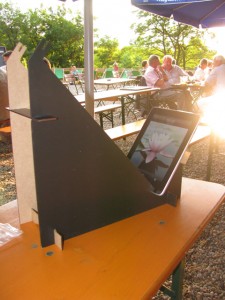
There's a blog report with video about the openKMQ kit for iPad (sorry folks, german only).
(Source: Danniil Matzkuhn / tblt.de)
Straight to the YouTube 2D video.
There's a blog report with video about the openKMQ kit for iPad (sorry folks, german only).
(Source: Danniil Matzkuhn / tblt.de)
Straight to the YouTube 2D video.
Intro video for the openKMQ kit for iPad (german)
Tags:
blog,
ipad,
ipad3-D,
ipad3D,
kmq,
openKMQ,
S3D,
stereo viewing,
stereographer,
stereoscopic,
YouTube,
YouTube3D
Dienstag, 27. Juli 2010
New tutorial how to do S3D with Blender
Berlin based Sebastian Schneider did a very welcome online tutorial Stereoscopic Rendering in Blender. I hope to get him on the openKMQ bandwagon soon ;-)
New tutorial how to do S3D with Blender
Please create content like this ...
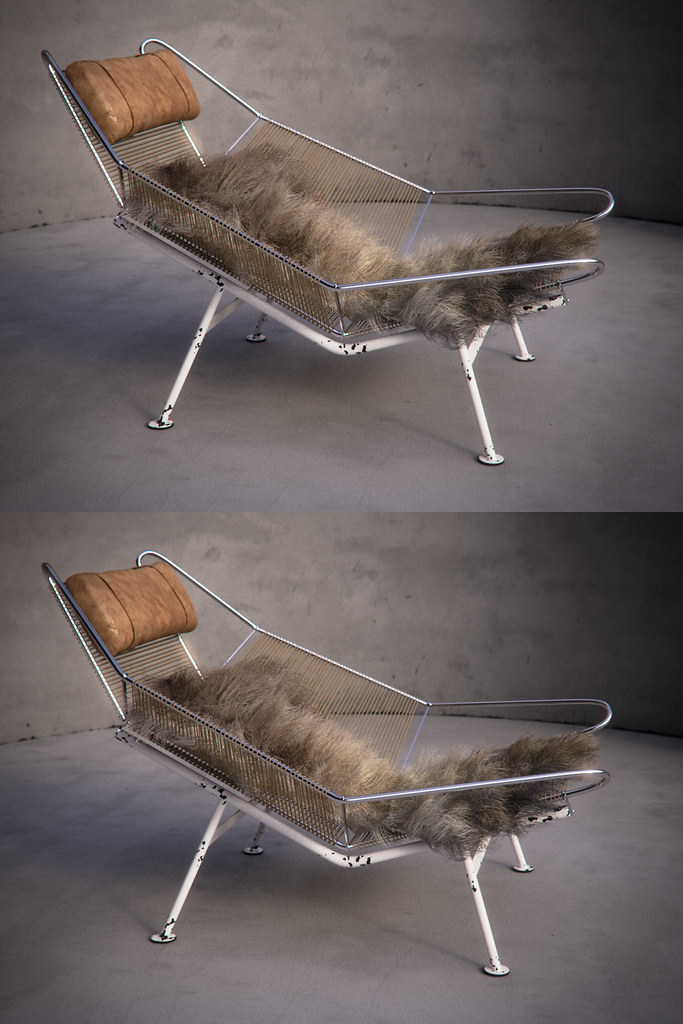
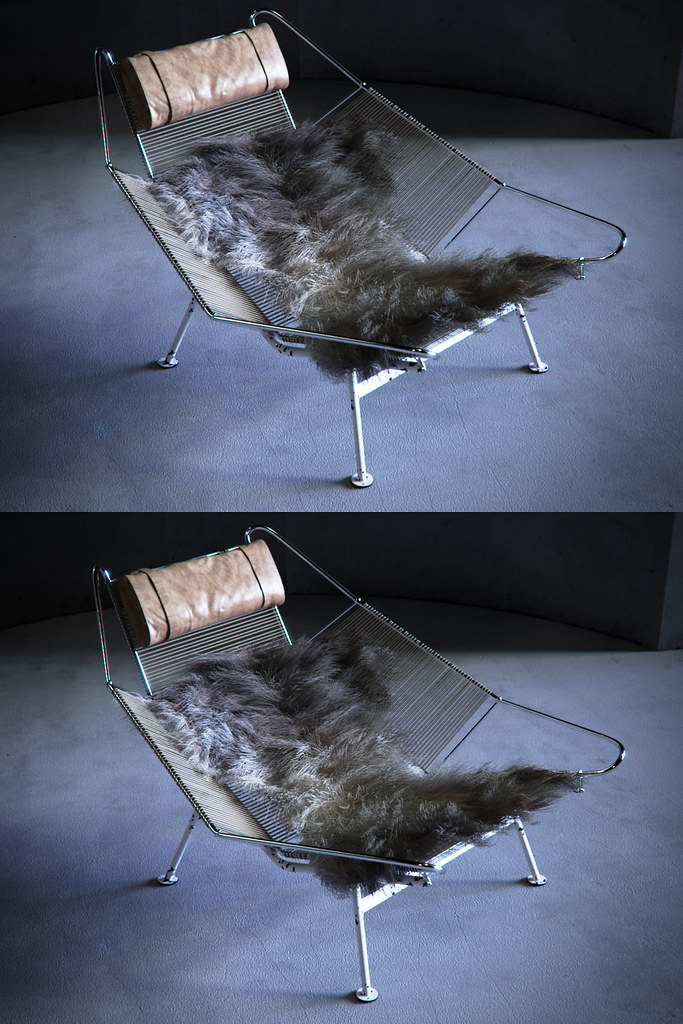
These renderings are done with VRay/3Dmax by a Berlin based artist.

click to enlarge

click to enlarge

click to enlarge
Inspirational S3D work by 3D viz pro Bertrand Benoit, one of the early adopters of openKMQ.
Read the recent interview with the artist.
click to enlarge
click to enlarge
click to enlarge
Inspirational S3D work by 3D viz pro Bertrand Benoit, one of the early adopters of openKMQ.
Read the recent interview with the artist.
These renderings are done with VRay/3Dmax by a Berlin based artist.

click to enlarge

click to enlarge

click to enlarge
Inspirational S3D work by 3D viz pro Bertrand Benoit, one of the early adopters of openKMQ.
Read the recent interview with the artist.
click to enlarge
click to enlarge
click to enlarge
Inspirational S3D work by 3D viz pro Bertrand Benoit, one of the early adopters of openKMQ.
Read the recent interview with the artist.
Please create content like this ...
Tags:
3Dmax,
3Dviz,
archviz,
Bertrand Benoit,
Blender,
CUDA,
NVidia,
octane,
openKMQ,
S3D,
unbiased rendering,
VRay
Abonnieren
Posts (Atom)
